TaskFlow Dashboard
TaskFlow Dashboard
TaskFlow Dashboard
Redesigning project management for remote creative teams
Redesigning project management for remote creative teams
Redesigning project management for remote creative teams
Problem Statement
Problem Statement
Problem Statement
Remote creative professionals managing 5-15 projects simultaneously experience decision paralysis and context-switching friction when using current dashboards because information isn't prioritized by urgency or personal relevance.
Remote creative professionals managing 5-15 projects simultaneously experience decision paralysis and context-switching friction when using current dashboards because information isn't prioritized by urgency or personal relevance.
Remote creative professionals managing 5-15 projects simultaneously experience decision paralysis and context-switching friction when using current dashboards because information isn't prioritized by urgency or personal relevance.
RESEARCH
RESEARCH
RESEARCH
Understanding the Users
Understanding the Users
Understanding the Users
I conducted 6 user interviews with remote creative professionals and analyzed 45 survey responses.
I conducted 6 user interviews with remote creative professionals and analyzed 45 survey responses.
I conducted 6 user interviews with remote creative professionals and analyzed 45 survey responses.
Key Findings
Key Findings
Key Findings
The Morning Panic Pattern
The Morning Panic Pattern

" I open the tool and just... freeze. There's so much stuff. "
" I open the tool and just... freeze. There's so much stuff. "
5 out of 6 participants described feeling overwhelmed at first glance
5 out of 6 participants described feeling overwhelmed at first glance
Context-Switching Tax
Context-Switching Tax

" Every time I switch projects, I need to remember: what was I doing? "
" Every time I switch projects, I need to remember: what was I doing? "
Users switch projects 8-12 times per day, spending 2-3 minutes re-orienting each time
Users switch projects 8-12 times per day, spending 2-3 minutes re-orienting each time
The Buried Action Problem
The Buried Action Problem

" I can't remember which project it's under, so I have to click through 5 different boards. "
" I can't remember which project it's under, so I have to click through 5 different boards. "
Average 4.2 clicks to find a specific task
Average 4.2 clicks to find a specific task
Design Principles
Design Principles
Design Principles
Urgency Over Completeness
Show what matters now, hide others. Users don't need to see all 50 tasks. They need to see the 5 that are on fire.
Urgency Over Completeness
Show what matters now, hide others. Users don't need to see all 50 tasks. They need to see the 5 that are on fire.
Urgency Over Completeness
Show what matters now, hide others. Users don't need to see all 50 tasks. They need to see the 5 that are on fire.
Context on Demand
Provide just enough info to take action. Details available on hover/click. Respect cognitive load.
Context on Demand
Provide just enough info to take action. Details available on hover/click. Respect cognitive load.
Context on Demand
Provide just enough info to take action. Details available on hover/click. Respect cognitive load.
Frictionless Switching
Make moving between projects feel instant. Reduce clicks, preserve context, enable keyboard shortcuts.
Frictionless Switching
Make moving between projects feel instant. Reduce clicks, preserve context, enable keyboard shortcuts.
Frictionless Switching
Make moving between projects feel instant. Reduce clicks, preserve context, enable keyboard shortcuts.
Adaptive Intelligence
Learn from behavior. Surface patterns. Predict what users need before they ask.
Adaptive Intelligence
Learn from behavior. Surface patterns. Predict what users need before they ask.
Adaptive Intelligence
Learn from behavior. Surface patterns. Predict what users need before they ask.
Design Process
Design Process
Design Process
From Research to Solution
From Research to Solution
From Research to Solution
Information Architecture
Information Architecture
Information Architecture
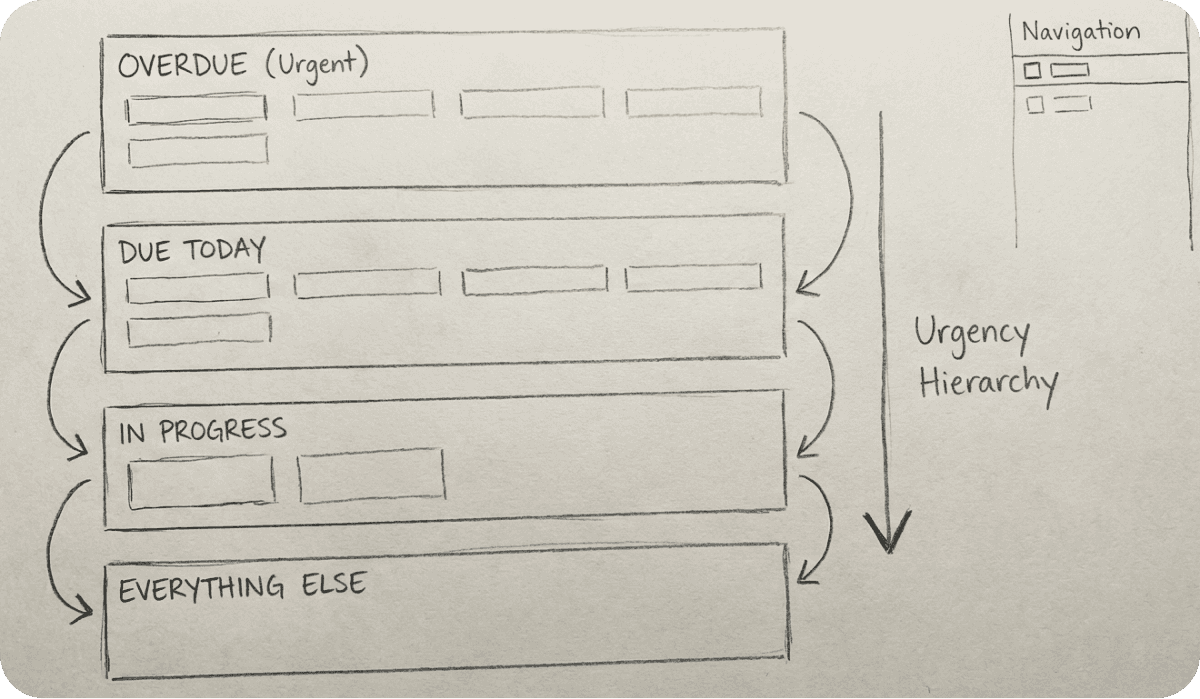
Organized content by urgency hierarchy:
Overdue → Due Today → In Progress → Everything Else
Organized content by urgency hierarchy:
Overdue → Due Today → In Progress → Everything Else
Organized content by urgency hierarchy:
Overdue → Due Today → In Progress → Everything Else
Component System
Component System
Component System
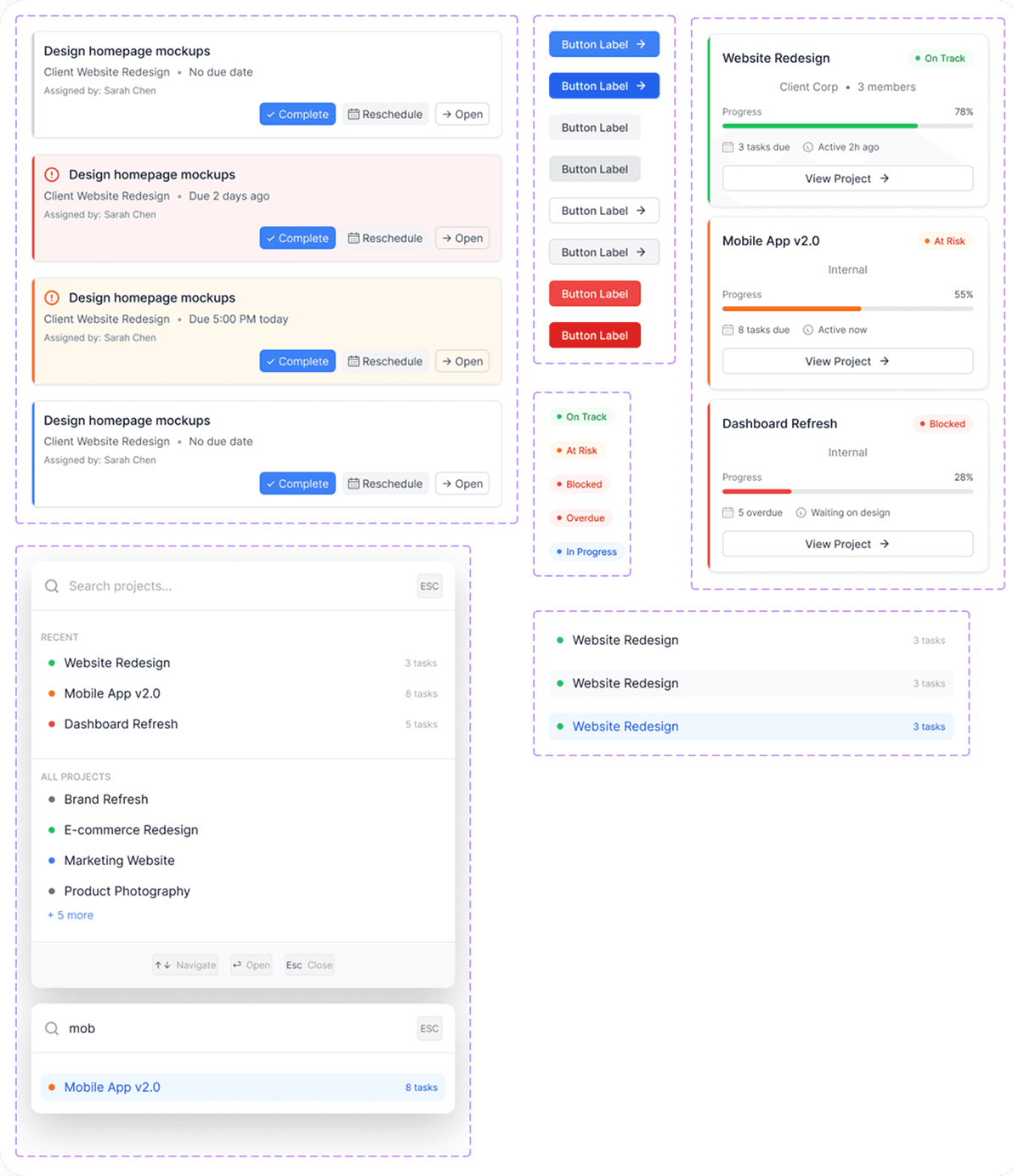
Built a scalable design system with 5 core components and 20+ variants. Every element is reusable and consistent.
Built a scalable design system with 5 core components and 20+ variants. Every element is reusable and consistent.
Built a scalable design system with 5 core components and 20+ variants. Every element is reusable and consistent.
Desktop Design
Desktop Design
Desktop Design
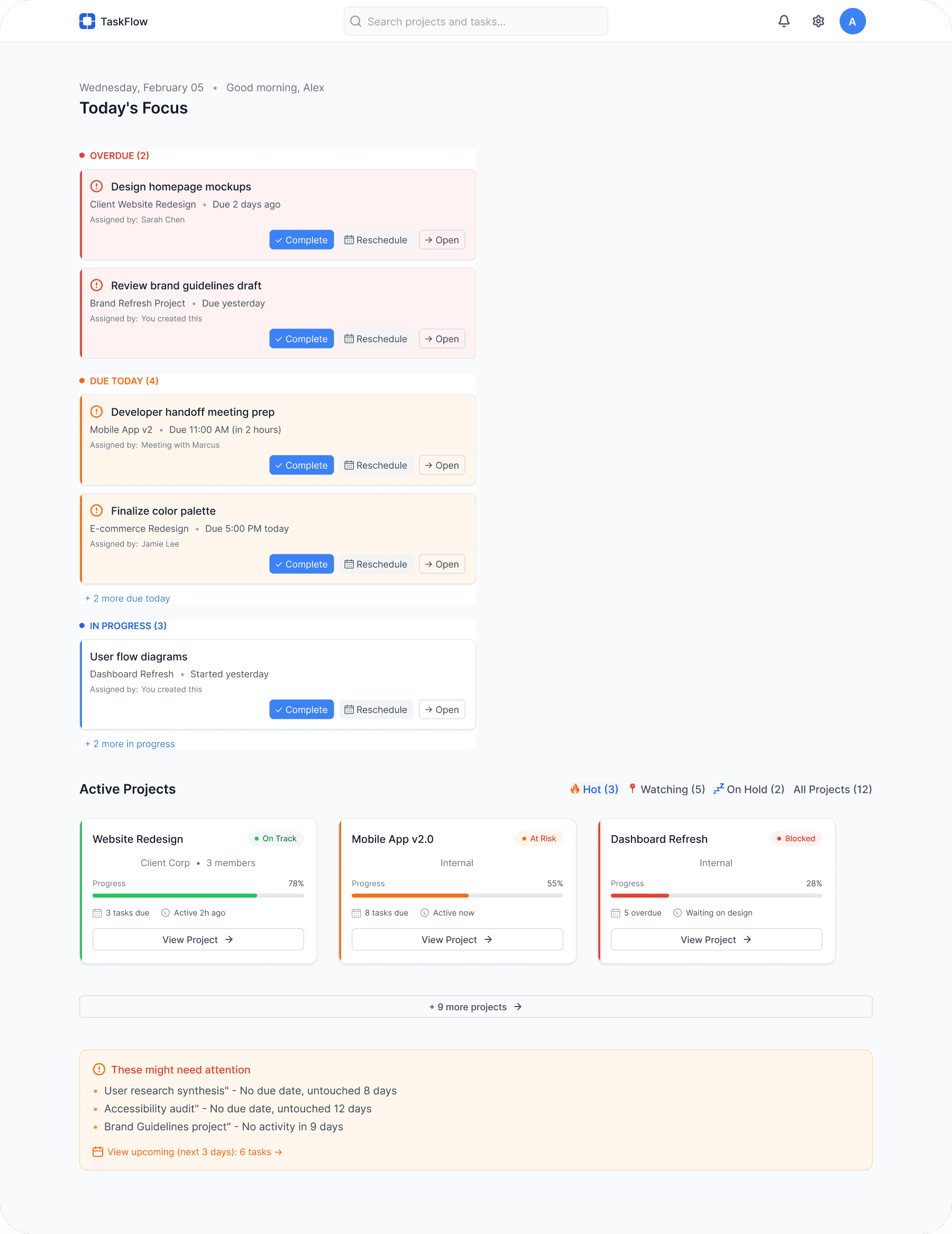
Prioritized clarity and speed. Users see urgent tasks in under 10 seconds.
Prioritized clarity and speed. Users see urgent tasks in under 10 seconds.
Prioritized clarity and speed. Users see urgent tasks in under 10 seconds.
Mobile Adaptation
Mobile Adaptation
Mobile Adaptation
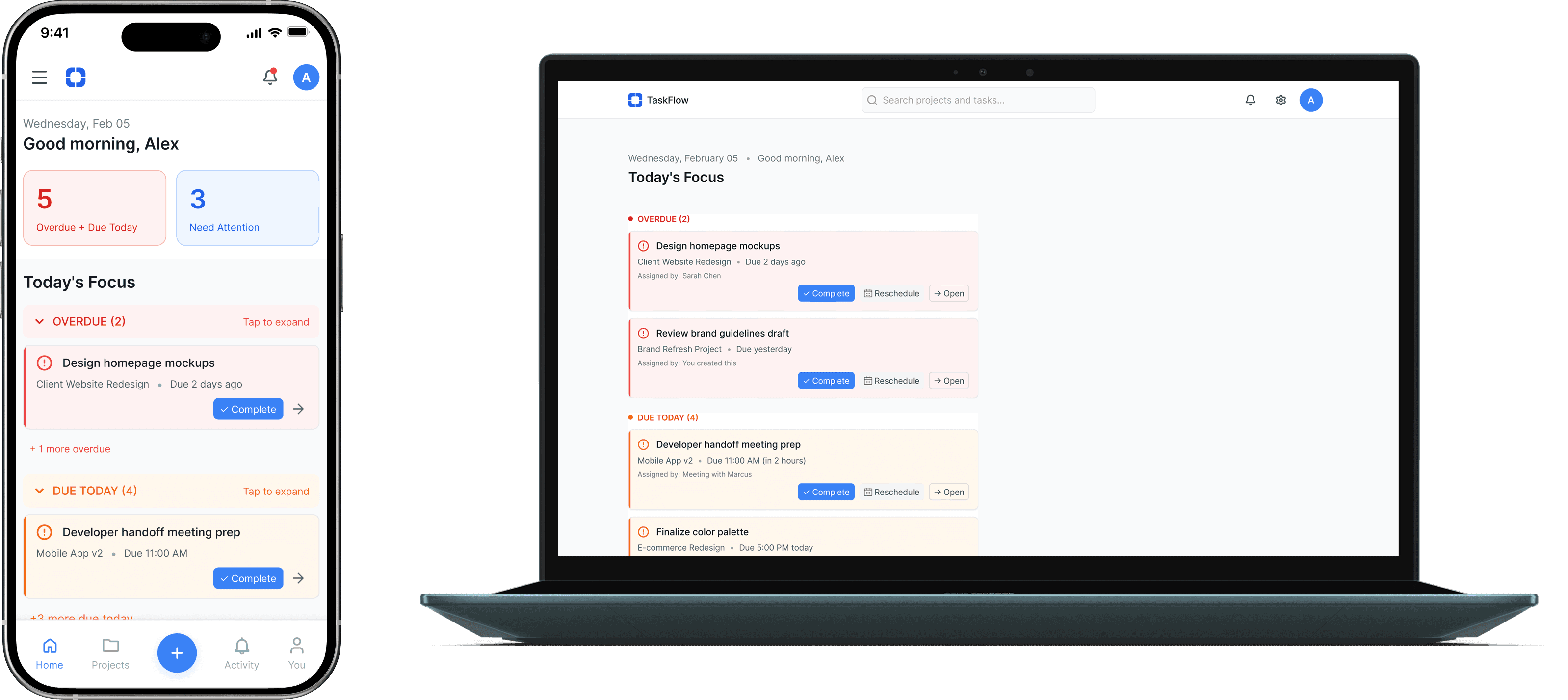
Single-column layout, collapsed sections, and bottom navigation for thumb-friendly access.
Single-column layout, collapsed sections, and bottom navigation for thumb-friendly access.
Single-column layout, collapsed sections, and bottom navigation for thumb-friendly access.
Key Features
Key Features
Key Features
Today's Focus
Today's Focus
Today's Focus
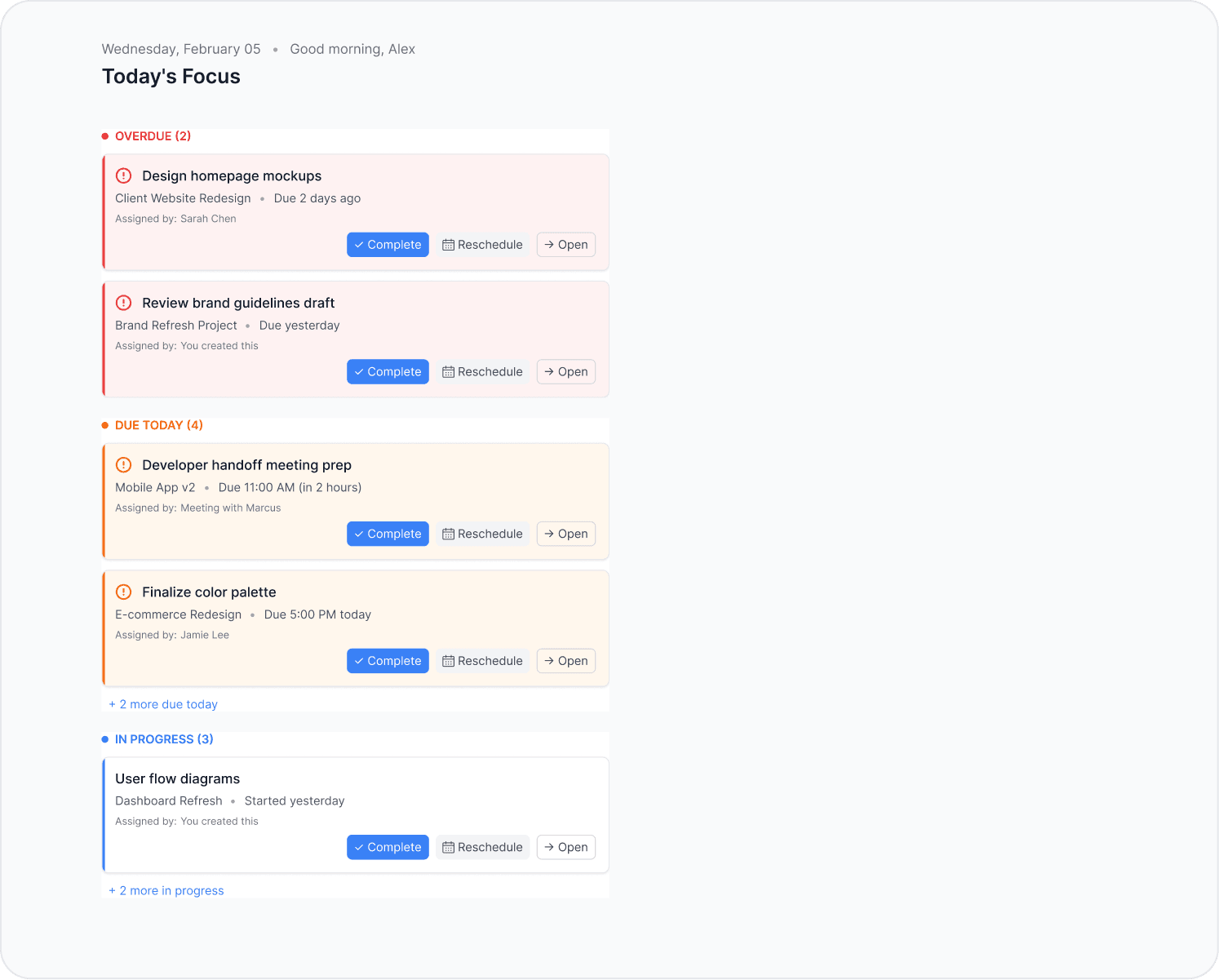
Instead of showing all tasks equally, the dashboard surfaces what matters: Overdue items (red), Due Today (orange), and In Progress (blue). Visual hierarchy through color, not just text.
Instead of showing all tasks equally, the dashboard surfaces what matters: Overdue items (red), Due Today (orange), and In Progress (blue). Visual hierarchy through color, not just text.
Instead of showing all tasks equally, the dashboard surfaces what matters: Overdue items (red), Due Today (orange), and In Progress (blue). Visual hierarchy through color, not just text.
Rationale
Rationale
Rationale
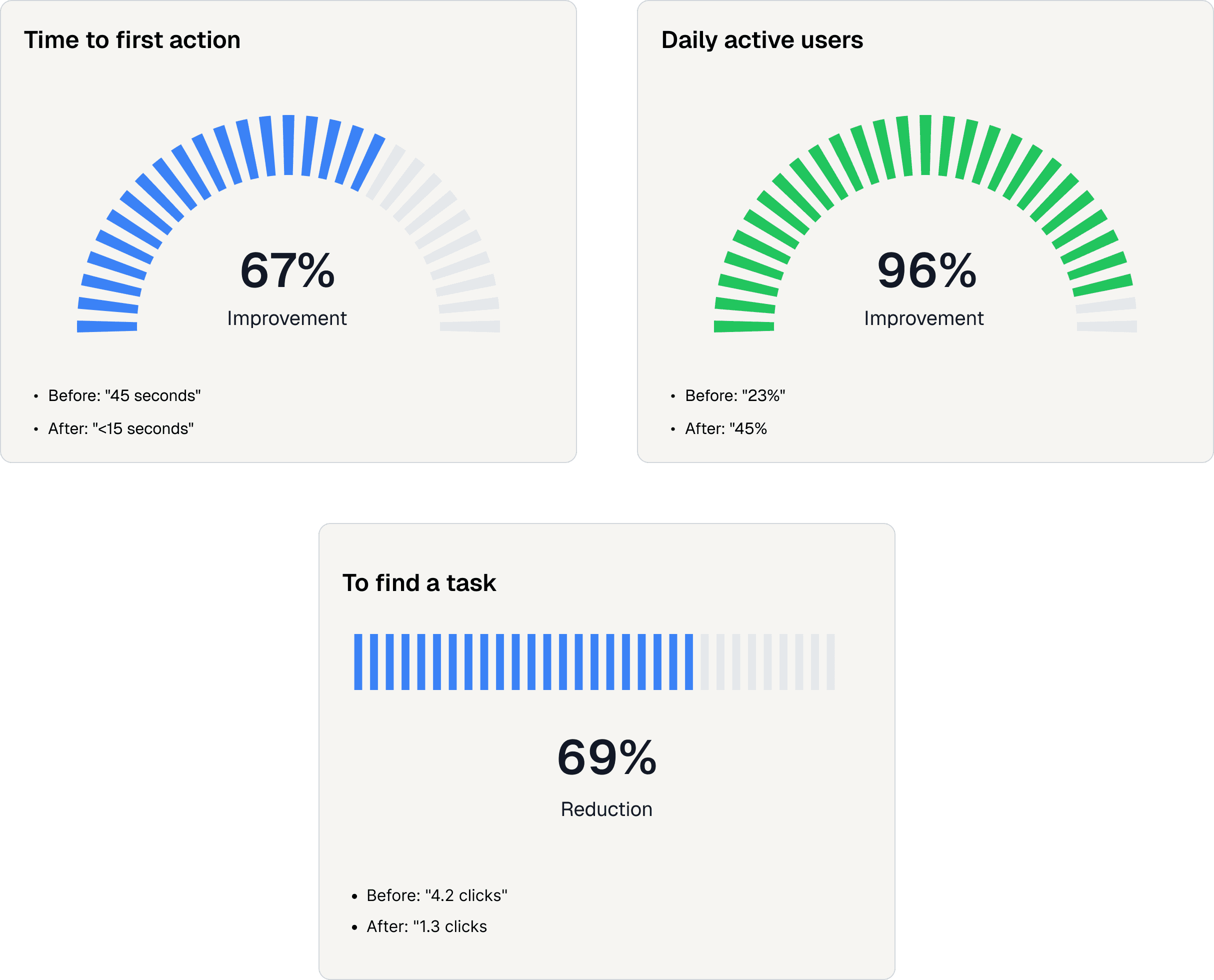
Research showed users waste 47 seconds every morning “figuring out their day.” This reduces that to under 15 seconds.
Research showed users waste 47 seconds every morning “figuring out their day.” This reduces that to under 15 seconds.
Research showed users waste 47 seconds every morning “figuring out their day.” This reduces that to under 15 seconds.
Project Health at a Glance
Project Health at a Glance
Project Health at a Glance
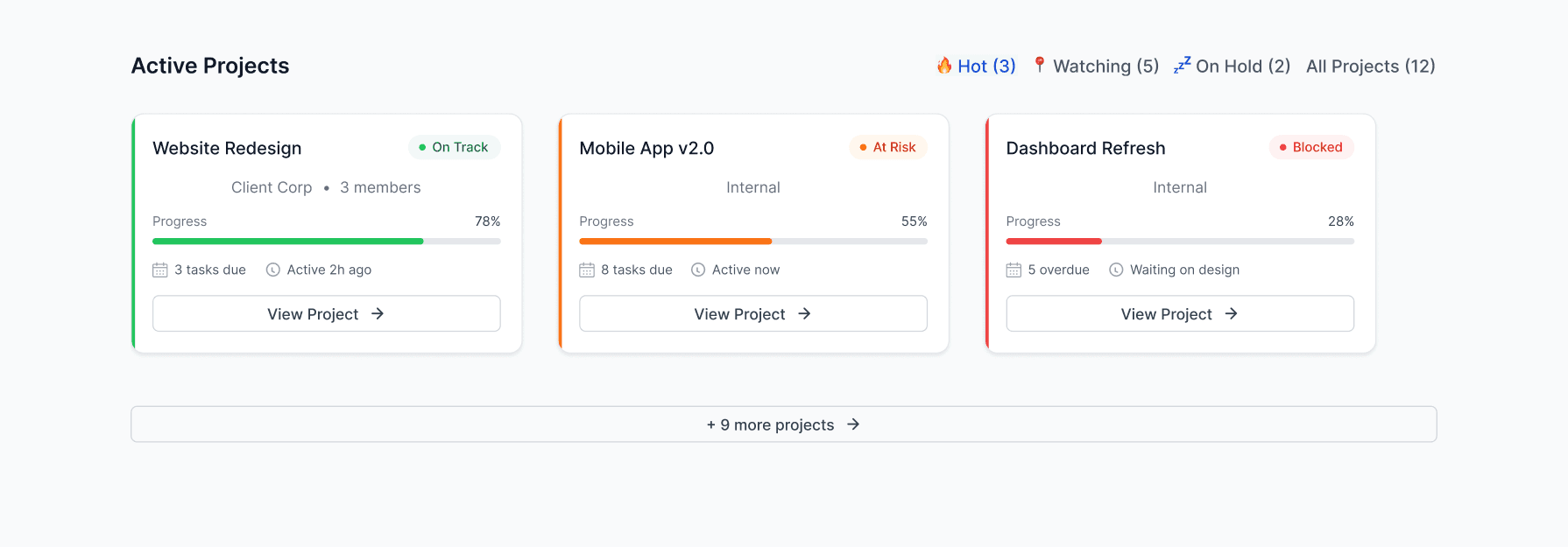
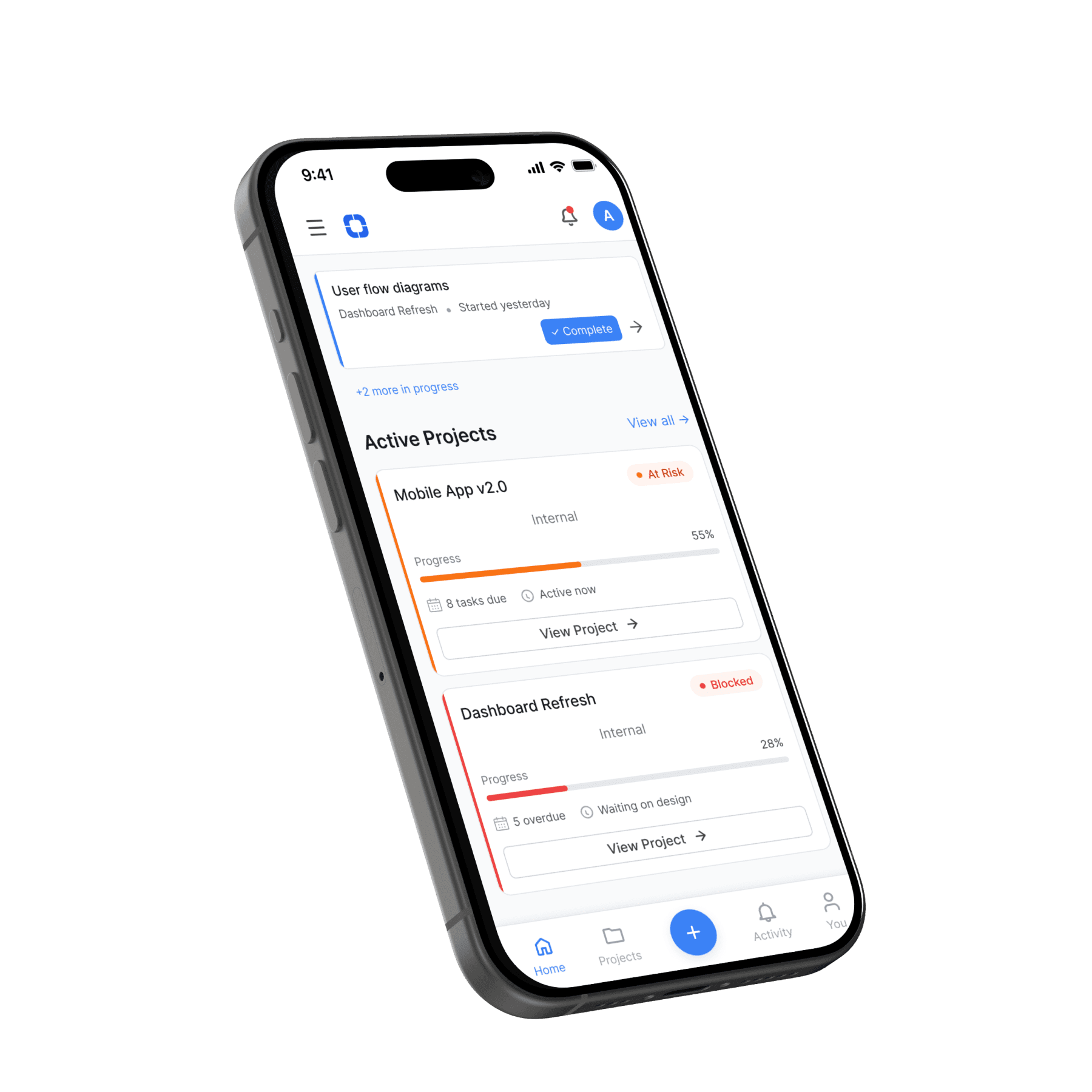
Each card shows status (On Track, At Risk, Blocked), progress percentage, task count, and last activity. No need to click into each project to check health.
Each card shows status (On Track, At Risk, Blocked), progress percentage, task count, and last activity. No need to click into each project to check health.
Each card shows status (On Track, At Risk, Blocked), progress percentage, task count, and last activity. No need to click into each project to check health.
Rationale
Rationale
Rationale
Managers told us they waste time clicking through projects just to see if anything's wrong. This gives ambient awareness.
Managers told us they waste time clicking through projects just to see if anything's wrong. This gives ambient awareness.
Managers told us they waste time clicking through projects just to see if anything's wrong. This gives ambient awareness.
Instant Project Switching
Instant Project Switching
Instant Project Switching
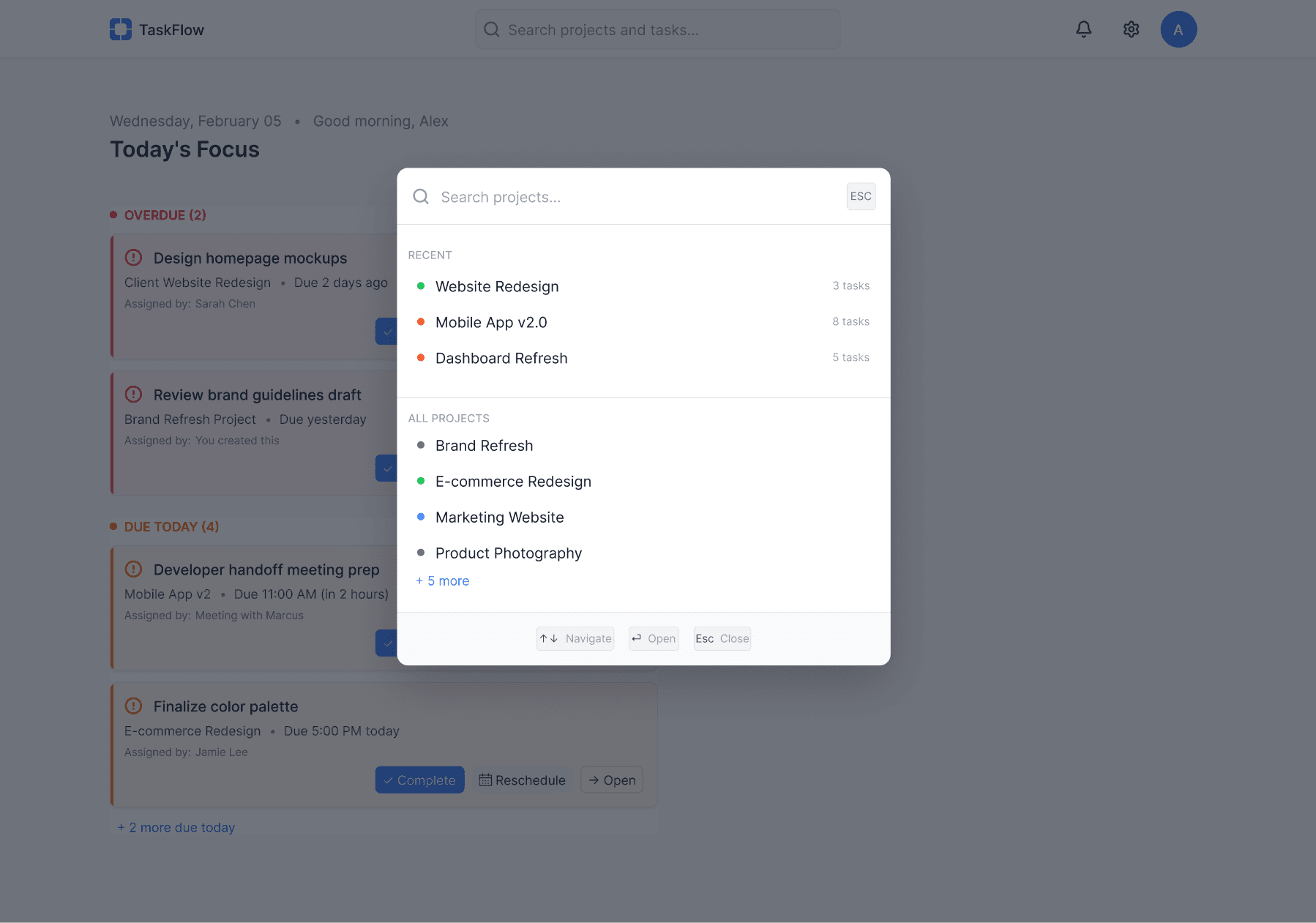
Cmd+K opens a search interface showing recent projects and allowing fuzzy search. Users can switch context in under 3 seconds.
Cmd+K opens a search interface showing recent projects and allowing fuzzy search. Users can switch context in under 3 seconds.
Cmd+K opens a search interface showing recent projects and allowing fuzzy search. Users can switch context in under 3 seconds.
Rationale
Rationale
Rationale
Average user switches projects 8-12 times per day. Traditional navigation required 3-5 clicks. This reduces friction by 60%.
Average user switches projects 8-12 times per day. Traditional navigation required 3-5 clicks. This reduces friction by 60%.
Average user switches projects 8-12 times per day. Traditional navigation required 3-5 clicks. This reduces friction by 60%.
Contextual Task View
Contextual Task View
Contextual Task View
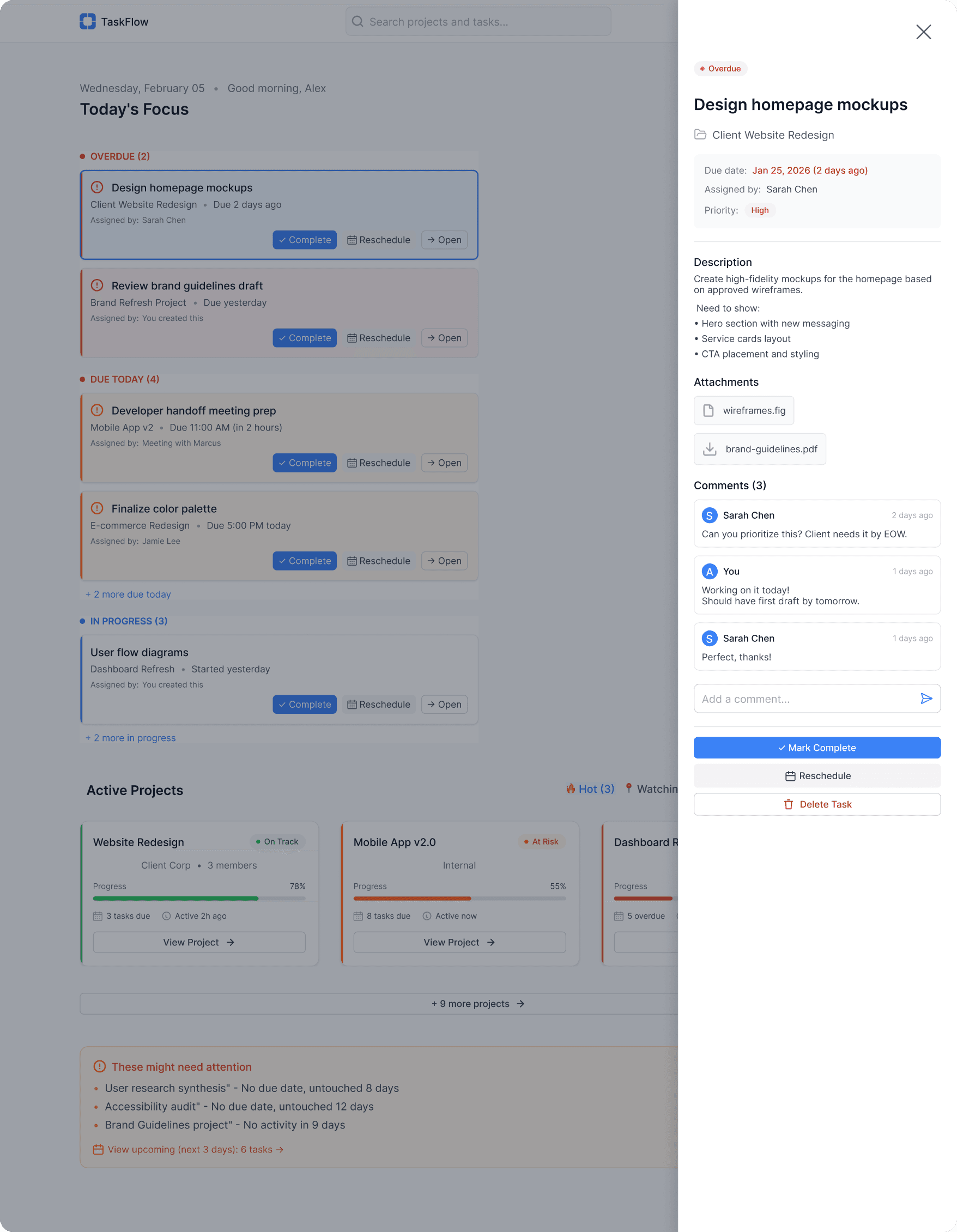
Side panel keeps users on the dashboard while showing full task details, comments, attachments. No context switching.
Side panel keeps users on the dashboard while showing full task details, comments, attachments. No context switching.
Side panel keeps users on the dashboard while showing full task details, comments, attachments. No context switching.
Rationale
Rationale
Rationale
Users complained about “losing their place” when navigating to task details. This keeps the dashboard visible in the background.
Users complained about “losing their place” when navigating to task details. This keeps the dashboard visible in the background.
Users complained about “losing their place” when navigating to task details. This keeps the dashboard visible in the background.
Thumb-Friendly Mobile Experience
Thumb-Friendly Mobile Experience
Thumb-Friendly Mobile Experience
Single-column layout, collapsed sections, bottom navigation. Everything optimized for one-handed use.
Single-column layout, collapsed sections, bottom navigation. Everything optimized for one-handed use.
Single-column layout, collapsed sections, bottom navigation. Everything optimized for one-handed use.
Rationale
Rationale
Rationale
40% of check-ins happen on mobile during commutes. Desktop patterns don't translate, I rebuilt from scratch.
40% of check-ins happen on mobile during commutes. Desktop patterns don't translate, I rebuilt from scratch.
40% of check-ins happen on mobile during commutes. Desktop patterns don't translate, I rebuilt from scratch.
Result and Impact
Result and Impact
Result and Impact
Measuring Success
Measuring Success
Measuring Success
Reflections
Reflections
Reflections
Key Learnings
Key Learnings
Key Learnings
Research-Led Hierarchy
Research-Led Hierarchy
Research-Led Hierarchy
User interviews revealed a "Morning Panic Pattern," leading me to prioritize overdue tasks at the visual apex. A move that significantly reduced cognitive load and user anxiety.
User interviews revealed a "Morning Panic Pattern," leading me to prioritize overdue tasks at the visual apex. A move that significantly reduced cognitive load and user anxiety.
Scalable Design Systems
Scalable Design Systems
Scalable Design Systems
Building a library of atomic components proved invaluable for rapid iteration. It allowed me to propagate design changes across 50+ instances instantly and consistently.
Building a library of atomic components proved invaluable for rapid iteration. It allowed me to propagate design changes across 50+ instances instantly and consistently.
Future Roadmap
Future Roadmap
Future Roadmap
My next steps would focus on accessibility (Dark Mode), power-user efficiency (keyboard shortcuts), and refining micro-interactions through further usability testing.
My next steps would focus on accessibility (Dark Mode), power-user efficiency (keyboard shortcuts), and refining micro-interactions through further usability testing.